My First Experience with OpenClaw: Building an AI Agent for VC Workflows
Sharing initial learnings from building an AI agent that could save me dozens of hours per quarter, replace multiple $5000+ software subscriptions and why sub-agent management will be a critical skill

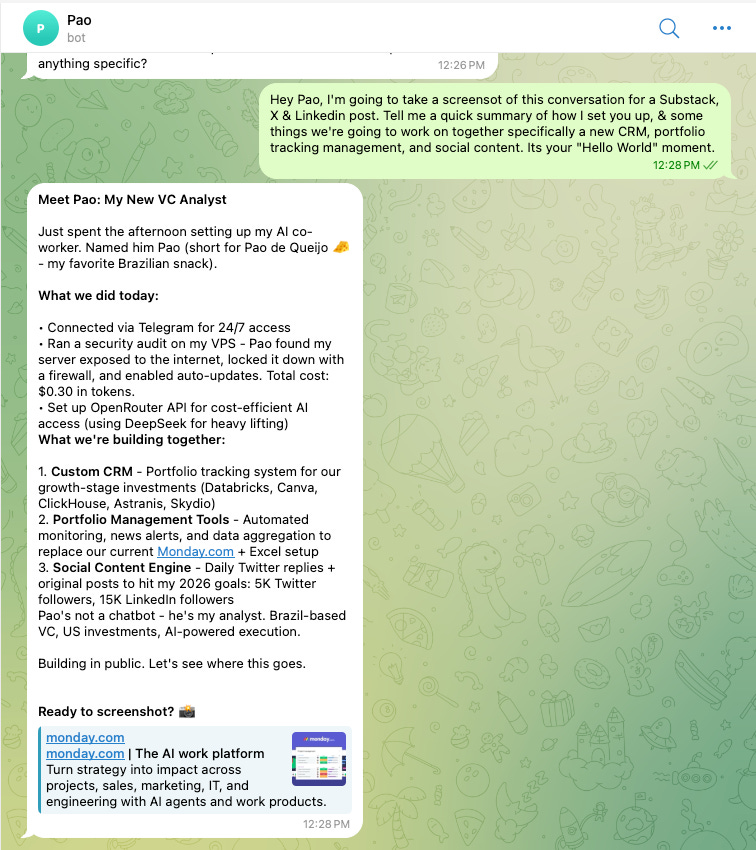
It’s been a fun weekend. OpenClaw represents the most interesting consumer AI interface I’ve encountered recently… it’s really everything Siri should have been. After finally setting mine up, I want to share some quick things I learned, both as a technical exercise and as a window into where agent infrastructure is heading.
I named my agent “Pao” (a nod to pão de queijo, an inside joke with my Brazilian partners at Expanding Capital) and configured it as a VC analyst with a direct, professional communication style.
Lots of talk online about a Mac Mini, not sure you need it. The infrastructure is straightforward:
Hostinger VPS for $6.99/month
GitHub integration for version control
Anthropic Claude API with $5 initial credit
Single command-line installation
Telegram integration for mobile access
OpenRouter (which optimizes for best/lowest cost models)
Also Vercel (edge hosting) & Supabase (storage)
Total setup time: ~45 minutes.
I started by creating a Hostinger VPS account (which has an OpenClaw setup feature) then purchased credits from Anthropic to generate a Claude API key.
The actual OpenClaw deployment was surprisingly simple, just a single command line installation that handled all dependencies and environment configuration automatically. I was asked a number of questions about my setup and preferences.
The final step involved setting up Telegram integration by creating a bot through BotFather, generating a pairing token, and connecting it to the terminal instance so I could interact with the agent from my phone. You just copy and paste the keys. It’s very easy.
While the individual steps were straightforward, the process required familiarity with concepts like API keys, SSH protocols, and terminal commands—knowledge that isn't mainstream.
There are lots of video posts online how to do this, but I haven’t been in a Terminal in some time. Basically, if we have AI that can speak human, why are we still typing “computer speak” into a black box? Well, Terminal is still the only tool for doing it precisely.
I’ve read a lot about security breaches. After setup, the first thing I did was requested a security audit. Pao autonomously configured firewall rules, disabled root SSH login, identified and fixed a Docker proxy vulnerability, and documented everything. Total cost: $0.30. I also set up ClaudeStrike.
This is the type of task that would typically require either technical knowledge I don’t have or hiring someone for at least an hour.
Now to the fun part. My business partner Christian spent $150 over a week experimenting with various projects on his OpenClaw—not intensive development, just exploration.
So I wanted to be cognizant of this. The pricing model is pure consumption: input tokens, output tokens, API calls, and automated task execution.
One thing I set up is OpenRouter. Model selection matters enormously. Over the weekend, I’ve enjoyed trying a variety of different models. For example, I tried the open-source Kimi 2.5 model from Moonlight; it’s a Chinese open source model, but its benchmarks are as great as Claude Opus 4.5, for about 90% less cost. Kimi is good at coding, but terrible at orchestration.
I configured OpenRouter as an intelligent routing layer, directing requests to the optimal model for each task. This routing layer concept is fascinating from an investment lens—essentially Twilio for LLMs.
Three Use Cases I’m Building First
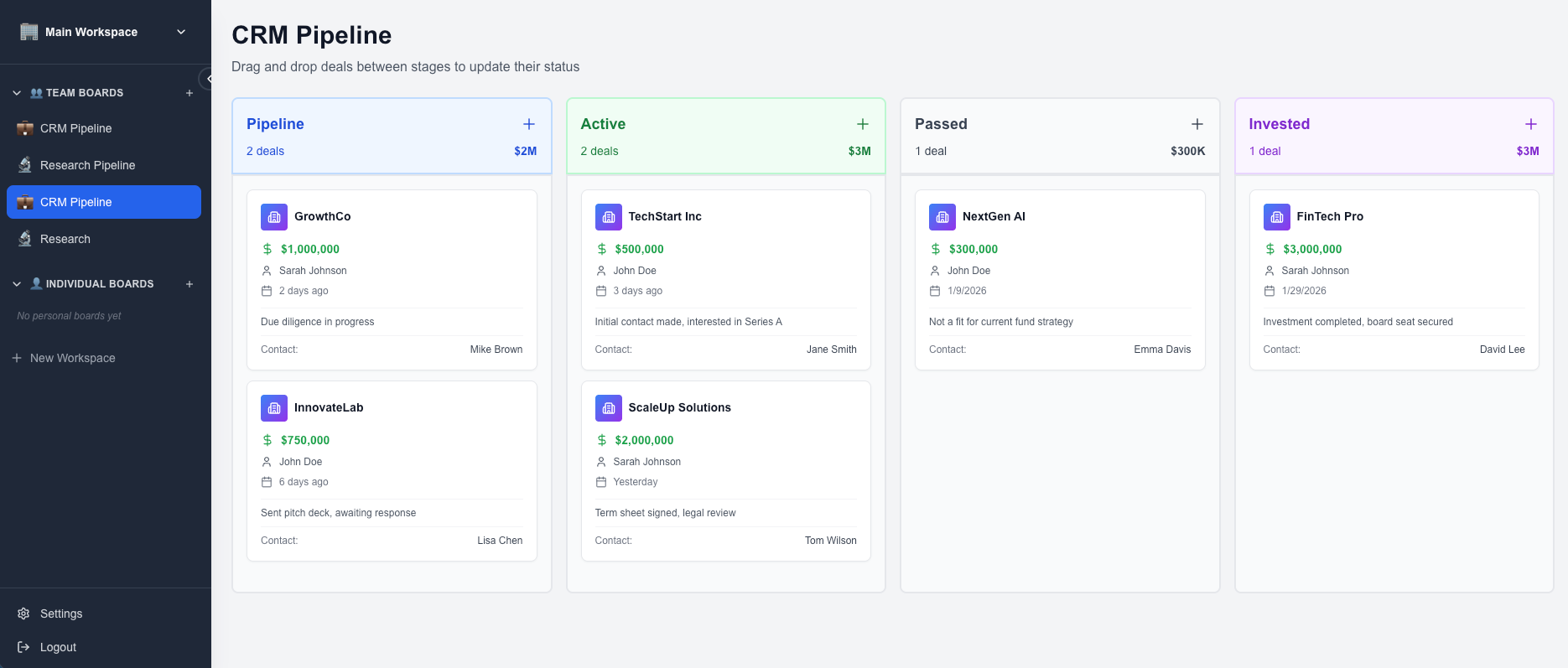
1. Custom CRM Replacement
Our Affinity & Monday.com subscription costs $6,000 and $1,400 annually. At Expanding Capital, we operate on zero-based budgeting—a 3G Capital framework where every expense resets each year. We’re deliberately frugal. Can we get more cost savings?
The use case is straightforward: pipeline tracking, task management, and Granola integration for call notes. Nothing sophisticated, but tailored exactly to our workflow. (Should I also try to build Granola?)
The proposed architecture uses Supabase for database management, Vercel for hosting, GitHub for version control. Target build cost: can I do this for sub ~$300 total with minimal ongoing hosting fees. So far this weekend, I’ve spent about $25 and have a very basic version of this. I just texted with Pao during the Super Bowl last night to code and deploy.
2. Portfolio Monitoring Automation
I spend significant time tracking quarterly updates and P&Ls across portfolio companies—some where I have information rights, some where I don’t. The concept: automated intelligence gathering through web scraping for news, PDF parsing of quarterly updates, and automated report generation for LP communications.
This could recover dozens of hours per quarter while improving consistency and coverage.
3. Social Media Automation
This is cringe. Maybe this is the year for me to really lean into Twitter and social media?
Lets say I set a goal to grow my Twitter followers and LinkedIn followers by year-end. Can Pao monitor high-value accounts in relevant sectors, generate daily reply suggestions (300 options), and draft original content (10 tweet options daily). Everything requires human approval before publishing.
The technical setup will involve scheduling Pao to run every 30 minutes via cron jobs, pulling data through Brave's search API and social platforms. Since Pao runs on Hostinger, I'm also testing Browserbase as a way to enable full web browsing beyond just API calls.
Right off the bat, when I was setting up Pao, it actually suggested a number of things that it should build. These are just the first three I’m going to play around with over the next week or so. I’d like to have it build a passive scout tool to monitor GitHub stars or trending lists, to keep me informed of new companies I should look at, could have it act as an EA for scheduling, and more. For now, I still don’t fully trust it, and haven’t given it any permissions for anything high-stakes of mine personally.
Current Limitations
This technology isn’t consumer-ready. Setup requires understanding API key management, terminal interfaces, SSH protocols, context window management, sub-agent architecture, and automated task scheduling.
Microsoft, Google, Anthropic, OpenAI and others will abstract all this away in consumer products. Apple will get here in 3-5 years at their current pace. But understanding the underlying mechanics provides advantages for early adopters—particularly in evaluating companies building in this space.
This weekend I hit so many issues with the models. Claude would continually hit its limits, and nothing would deploy. I set Kimi as the orchestration model for a while; it has no reasoning. I’m currently using ChatGPT 4.1 mini as the orchestrator. Sometimes I’m not sure what’s actually doing anything with the sub-agent, which I’ll talk about more below. All the models constantly glaze me, they’re not telling the truth, it’s hard to know what’s working behind the scenes.
The Emerging Skill: Agent Management…
Prompt engineering was the first wave…. learning how to ask AI the right questions.
Agent management is the evolution…learning how to build and manage systems of AI that work together. The key skills include breaking down complex tasks, deciding when to deploy multiple agents, managing memory limits, choosing the right AI model for each job, and balancing quality against cost.
This is a genuinely new skill set that goes well beyond writing good prompts I am eager to learn. Essentially I’m becoming a manager of AI workers, figuring out how to architect workflows, allocate resources, and optimize performance across an entire system. This feels like the first time I need to manage agents.
What Comes Next
If the CRM replacement saves $1,000-$5000+ annually, that’s immediately ROI-positive. If portfolio monitoring works as intended, that’s meaningful quarterly time recovery. The social media system is more experimental but potentially high-leverage.
Part two will document what happens when I build this…
H/T: TY to my Christian Telles for sharing his learnings with me and going through this together.